If you're unsure on how to check an order, please read the following article first: How to Check an Order.
1. To locate your order, you'll first need to search your 'Pending Orders'. This can be found under the Shop > Orders.
2. To Complete or Cancel an order, you'll first need to locate the order in question and you should be able to view both a 'tick' and 'bin' icon.
- Tick - Marks the order as Complete.
- Bin - Cancels the order.
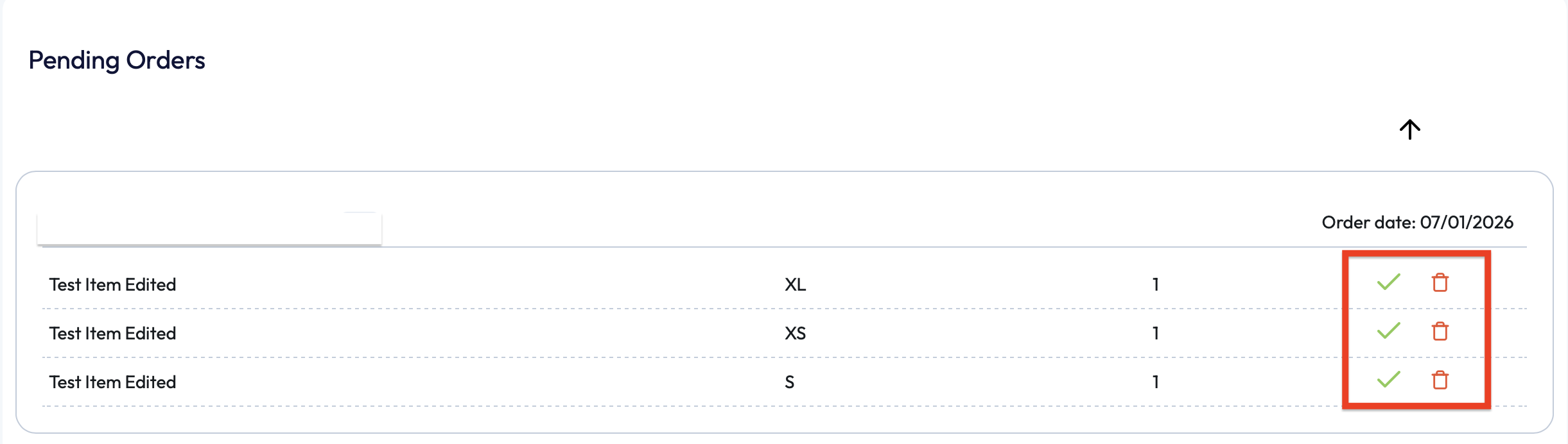
3. Once you've marked an order as completed or it's been cancelled, they will automatically move from the 'Pending Orders' section. So if you need to review this order again you'll need to navigate to the 'Completed Orders' or 'Cancelled Orders' heading.

If you require any further assistance, please contact us by completing this form
Was this article helpful?
That’s Great!
Thank you for your feedback
Sorry! We couldn't be helpful
Thank you for your feedback
Feedback sent
We appreciate your effort and will try to fix the article