Classroom Overview
The Classroom section is the main working area for teachers. It brings together everything needed to run lessons and manage students on a day-to-day basis — from taking the register and setting classwork to managing seating plans and evacuation registers.
Getting There
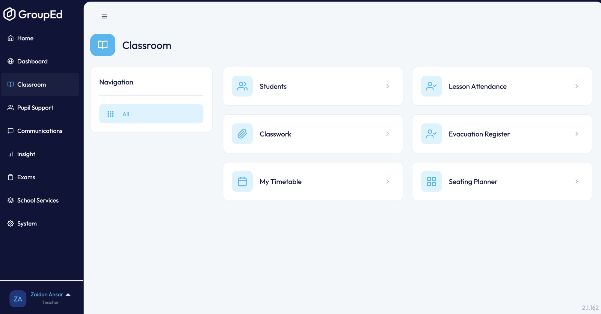
Click Classroom in the left-hand sidebar. The Classroom menu page opens, showing all available features.
What's Available in Classroom
The Classroom menu displays six sections as tiles. Click any tile to open that feature.
Feature | What it does |
Students | Browse and search your students. View individual student profiles including contact details, attendance history, behaviour records, and more. |
Lesson Attendance | Take the register for your lessons. Mark students as present, absent, or late and add attendance codes and comments. |
Classwork | Create and manage classwork tasks. Assign work to individual students or groups and track completion. |
My Marksheets | Access and complete marksheets assigned to you. Record student grades and assessment data directly in the app. |
Evacuation Register | Run a digital evacuation register during fire drills or emergencies. Mark students as accounted for in real time. |
Seating Planner | Design and manage classroom seating arrangements. Drag and drop students into seats and save plans for your lessons. |
Tip: Each Classroom feature has its own dedicated guide in this knowledge centre — see the Classroom section for step-by-step instructions on Lesson Attendance, Classwork, Marksheets, and more.
Was this article helpful?
That’s Great!
Thank you for your feedback
Sorry! We couldn't be helpful
Thank you for your feedback
Feedback sent
We appreciate your effort and will try to fix the article